Thursday, June 17, 2010

Use Those Thingies Thursday (a little early)


Need a challenge today? Recently, I participated in a 6x6 recipe swap. We each made 3 recipe pages for 6 people. What fun! And ... what a challenge! The biggest challenge we found, though, was not the recipe pages, but the "About Me" page that each of us did for the other participants. Yikes. That's so difficult to do.

My challenge to you today is to make an "About Me" page for yourself. Why, you say, would I EVER want to do that?! :) Well, honestly, it's a very cool 'photograph' of your life *right now*. I know that in 10 years, I will look back at my page and smile at some of the changes - and cry at others. What a great way to remember your life at a particular moment. As hard as it is to do, it would be a wonderful thing to do every 5 years or every 2 years or even once a year. Things in our lives change so fast; take a moment to remember TODAY.


Include a picture, a little about yourself, and some fabulous scrapping items on your page to demonstrate your style and things that you enjoy.

What did I do for mine?? Well, here ya go ....


Now ... get to work on yours!!!! I WANT to see them. Post a link in the comment lines below ... please. :)


Have an awesome Thursday and a great, big, beautiful tomorrow. I only have ONE day of VBS left after noon today!!! :) It has been a GREAT week, though.


~*Shell*~

Tuesday, June 15, 2010

Tooty Fruity Tuesday

Using any image available on your computer in SCAL ...

*** This tutorial is primarily for PC users. I do not know how to copy a screen on a Mac, but if you do, then just adapt this using that instead of the 'print screen' instruction.

If you find an image on your computer that you just love, wouldn't it be nice to use it in SCAL and cut it with your Cricut?? Well .... here's how you can do it. *Remember the functionality of your Cricut. Choose something that won't be too complex for your machine. Other than that detail, you can choose any image.

1- Get the image on your computer screen. You can email it to yourself (I often do this with punch images that I want to import - to make various sizes and/or shadows), upload it to Photobucket or the like, find it on the internet, or find it in a program on your system (graphics program, Word, CDS, PrintMaster, etc). A good contrast (between image and background) is essential. A black image on a white background is best.


2- For some images, you can right click on it, and it will allow you to save the file on your computer. If that's the case with your image, great! Right click on it, save it as something you can remember on your system, and follow the instructions for the Trace feature ... found < here>.

You may, also, be able to right click on the image and 'copy' it. If so, copy it, and then, 'paste' the image in your choice of graphics programs (I use Paint Shop Pro). Save it as a .jpg file type and use the Trace feature (instructions) in SCAL to import it.

If you cannot right click and save the image or copy it, continue with these instructions.

Hold down the key and press the key.
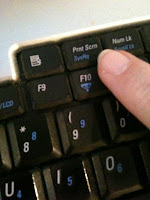


On my system (a laptop), this key is near the top of the keyboard toward the right-hand side. Holding these two keys down together will copy, or take a picture of, everything on your screen at that moment.


3 - Open your graphics program of choice - Photoshop, Paint Shop Pro, Paint, Gimp (available *free* online < here >.

4 - While inside the graphics program, hold down the key and the "V" key at the same time (paste). This will paste the whole screen shot inside your graphics program.
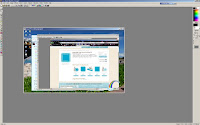


5 - Use the crop feature within your graphics program to to crop around ONLY the image you want to cut. You will want to crop out, cut out, delete, or erase any items that you do not want to cut.
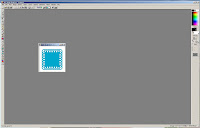


6 - Save the cropped image (should be just the item you want to cut) as one of the file types supported by SCAL -

.bmp
.gif
.jpg
.pict
.png
.psd
.tiff
.tga

7 - Open SCAL, and use the Trace feature. Instructions can be found < here >.


8 - Enjoy the fact that, in SCAL, you can cut ANYTHING you'd like to cut. :)


Have a fantastic Tuesday and a great, big, beautiful tomorrow! (Day 3 of VBS for me!!!)


~*Shell*~

Monday, June 14, 2010

Mojo Monday

Whew! VBS this week, so I'm running on adrenaline. :) Sooooo, did you find your mojo this weekend?

Father's Day ... Yep. That was my inspiration. My inspiration for this weekend. I wanted something a little different - not the typical 'masculine' Father's Day card. I wanted something whimsical for him this year.

I started with the Monkey Madness stamp set from Clear Dollar Stamps. I wanted to give the card dimension, so I imported a couple of the images into SCAL, welded them on to the edge of the card base, cut extras, and layers, and made this card.


The card stock is all SU, except the white (GP). Leaves of different sizes were cut to use around the card. The small ones at the bottom were cut to correspond to the cut-out edge on the card.


Some of the bigger ones were stretched a bit to add a little character and variety. VersaMark was used to stamp the little flowers in the background. Pop dots were used to add more dimension to the card, and the image, of course, was colored with Copics. :)


Another leaf was placed next to the sentiment inside the card.


I'm also using this card for my entry into the Fantabulous Cricut Challenge for this week. It works out great that the theme for the challenge is Celebrate Dear Dad. :)


Let me know what you think of my card! :)

Tomorrow - how to import ANY image on your computer, the web, or email into SCAL.


I hope you have an awesome Monday and a great, big, beautiful tomorrow.

~*Shell*~

Friday, June 11, 2010

Cricut Design Studio Font Pack

A new font pack update is available here for the Cricut Design Studio. This update adds these cartridges ...

  • Splish Splash
  • Bloom
  • Block Party
  • Varsity Letter
  • Feeling Groovy
  • Wildlife
  • B is for Boy
  • Sugar and Spice
  • Cherry Limeade
  • Botanicals
  • Billionaire
  • Meow
  • Handyman
  • Lovely Floral
  • Celebrate with Flourish
  • Dude!
  • Lacy Labels
  • Slumber Party
  • Hoot n Holler
  • Live Simply
  • Chore Chart
  • Cupcake Wrappers
  • Carousel
  • Pagoda Passion


Just a note ... I use Mozilla Firefox as my internet browser. If you use it, as well, switch to IE to do your update. For the last 2 updates, I've not been able to download and install them successfully using Firefox. Using IE instead fixed the problem.

Enjoy! Have an awesome Friday and a great, big, beautiful tomorrow.


~*Shell*~

Free File Friday

Today, I'm posting 2 free files. They are in .jpg or .gif format (both are supported by SCAL). To use them, simply click on the image, right click on it, and click 'save as.' Save it in an easy to remember place on your computer so that you can get to it when you want to use it. To get the file in SCAL, use the Trace feature. Click Trace, click browse, find the file, preview the cut, and import it into SCAL. All free .jpgs or .gifs offered on this blog have been previously cut on my machine.


Fireworks


Lattice Heart


Both of these files have been used on projects recently showcased on this blog. I would love to see what you can do with them!


Have a wonderful Friday and a great, big, beautiful tomorrow.


~*Shell*~